Some things a shopper needs to know before they buy.
Free shipping over $75. The sale ends Sunday. Orders ship a day late this week. Barlio puts them at the top of your store — in about a minute, without touching your theme.
Free plan, no card. Paid plans start at $9.99 a month with a 7-day trial.
Your words, in every template. Pick one to hold it.
Three things worth saying
All three are running below — the timer is counting and the meter is filling.
Live in about a minute
Three steps, and the third one is your storefront.
This is the whole app
Your bar across the top, exactly as a shopper will see it, staying put while you work. The settings underneath, one card each, so you open only what you came to change — and under the bar, whether it is showing and why. There is no second screen to learn.
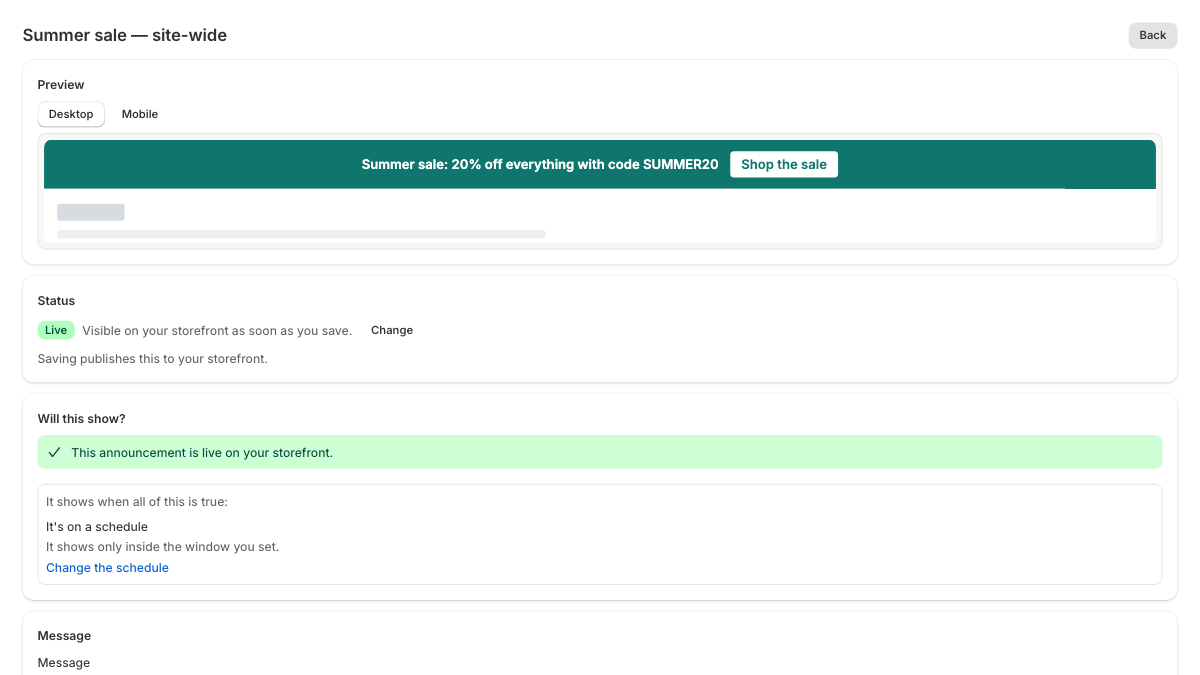
A real screenshot of the editor, not a drawing of it — captured from the app itself at 1200×675.
Twenty templates, none of them locked to a look
A starting point, never a mode. No dated gradients and no decorative type, because the bar should look like your store — not like an app bolted onto it.
Every color pair here meets WCAG AA contrast, including the button pill and the worst case behind a seasonal pattern. That’s checked by a test, not by eye.
It won’t slow your store down
Your bar’s settings travel inside the page Shopify already sent. Nothing we serve decides what your bar says, so no server of ours stands between a shopper and your shop while the page loads.
Everything you can change
Every color, type and layout control is on the free plan. A blue rectangle costs no more to build than a purple one, so we don’t charge for one.
The parts you only notice when an app gets them wrong
Your storefront is not ours to break. Where something was ambiguous, we picked whichever option couldn’t damage a live store.
What Barlio doesn’t do
One thing, done properly. If you need any of these, another app will serve you better — and it is cheaper to know that now than after you install.
- Pop-ups, email capture and spin-to-win
- Cart drawers, upsells and product recommendations
- A/B testing one bar against another
- Banners inside Shopify checkout
Pricing
Start free — and stay free, if one bar is all you need. Both paid plans include a 7-day trial and a yearly option.
- One live bar
- Color, type, spacing and position
- Choose which pages it shows on
- Live preview, drafts and a dismiss button
- Two live bars, taking turns
- Free shipping meters that follow the cart
- Countdowns to a shared deadline
- Scheduling, so a sale starts and stops on its own
- Seasonal background patterns
- Views and clicks, 30 days
- Twenty live bars, taking turns
- Country targeting
- Custom CSS, scoped to your bar
- All-time view and click totals
Questions people actually ask
Something else? Email barlio.support@gmail.com and say which store you are writing about — it makes everything faster.
Your first bar takes about a minute
Free plan, no card, and nothing added to your theme.
Barlio installs from the Shopify App Store. Shopify asks you to approve it, then Barlio opens in your admin. Already have it? Open it from your admin under Apps.